Gazing
- 3.6
- Rating
- 10.00K
- Installs
- Free
- Price

 Analysis by App-foxy
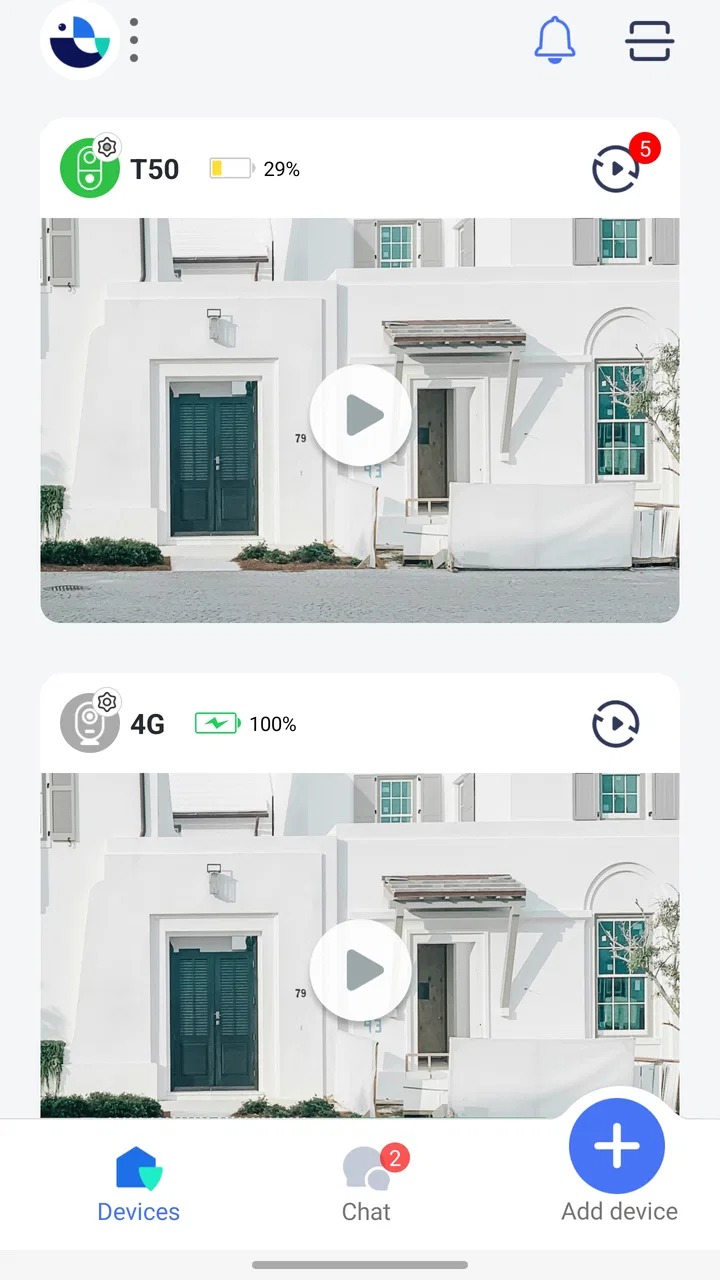
I approached Gazing as a practical visitor-monitoring tool rather than as another general-purpose communication app. Its basic idea is straightforward: it lets me talk with and see visitors through a smartphone. That makes it relevant for a home entrance, a small office, a studio, or any place where I may need to check who is outside without standing beside the door.
What makes the app worth considering is not a long list of extra functions, but the way it places that specific task on a phone. I can keep my attention on what I am doing, look at the visitor when needed, and decide whether speaking is enough or whether I should go to the entrance. In my experience, that is more useful than it sounds, especially when I am working in another room, carrying something, or simply do not want to interrupt what I am doing.
Gazing is a free Tools app from WebFront Innovations Limited, intended for everyone and compatible with Android devices running version 6.0 or later. The current release is 2.2.6, and the app has reached over ten thousand installs with an average score of 3.6 from around one thousand ratings. Those figures suggest a modest but established user base, rather than a platform I would assume is already polished for every type of household.
You May Also Like

 AccuWeather: Weather Radar
AccuWeather Review: A Quick, Clear Forecast for Everyday Decisions
For everyday plans, the best forecast is the one you can understand quickly. AccuWeather makes rain timing, radar, and local conditions easy to act on, with a few trade-offs.

 Hill Climb Racing
Why Hill Climb Racing Still Turns Crashes Into One More Run
A tiny car, a bumpy hill and one more upgrade: Hill Climb Racing keeps resurfacing because its simple chaos makes every near-miss feel personal.

 AliExpress - Shopping App
AliExpress Makes Global Shopping Feel Personal, but Shoppers Bear the Risk
AliExpress turns a global marketplace into a pocket-sized discovery engine. Its reach is useful, its shopping loop compelling, and its trade-offs easy to miss.

 Lords Mobile: Kingdom Wars
Lords Mobile Is a Kingdom-Building Routine, Not a Quick Match
A case-by-case verdict on the building, battles, device demands, and social commitments that make Lords Mobile rewarding for some players and exhausting for others.

 PDF Scanner app - TapScanner
TapScanner Makes Paperwork Easier to Capture, Check, and Share
TapScanner makes scanning with a phone feel less like a rescue operation and more like a dependable step in getting work done. Its capture tools are useful, though not flawless.

 Block Blast!
 Shows How Much a Puzzle Game Can Leave Out
A quiet grid game shows why puzzle players increasingly value instant clarity, repeatable skill and low-pressure play—and where the genre still needs to catch up.
More From Our News Desk
View All News


How Gazing feels in its current state
The first thing I noticed is that the app has a narrow purpose. It is not trying to replace a full smart-home system, a family messenger, or a security suite. The useful question is simply whether it helps me communicate with a visitor through my phone. If that is the problem I want to solve, its focused design is appealing. If I expect broad automation, recording tools, delivery management, or a large network of connected devices, I would look elsewhere.
A realistic example is working from a back room while waiting for a courier. With a conventional doorbell, I may hear a sound and still need to walk to the entrance before I know whether the person is a delivery driver, a neighbor, or someone I do not want to meet. Gazing is more useful when I can check the visitor first and speak from the phone. That small reduction in interruption is the app’s strongest everyday argument.
It can also suit a small workplace. A person at a reception point may not always be available, while someone elsewhere in the building may be the right person to answer. In that situation, a phone-based view and conversation can make the response more flexible. I would still treat it as a convenience layer, not as a complete access-control solution.
The app’s Everyone rating makes it approachable for a mixed household or a basic shared device. Still, an age rating does not automatically mean that every setup will be equally simple. The experience depends on how the connected visitor equipment and the phone are arranged, and that is where a user should pay attention during installation rather than assuming the app alone solves the whole communication chain.
The setup questions I would answer before relying on it
Before making Gazing part of my daily routine, I would confirm which device is expected to capture the visitor’s image and which device is expected to receive the conversation. The store summary explains the outcome, but the practical success of a system like this depends on the relationship between the phone and the visitor-side hardware. I would test that relationship while standing in different rooms, not only beside the entrance.
I would also test the app at the times I am most likely to need it. A quick daytime check is not enough if visitors may arrive while the phone is locked, while I am using another application, or while the device is connected to a different network. I would want to know how quickly the alert appears, whether the video starts without unnecessary steps, and whether the conversation remains understandable from the location where I normally work.
That testing routine is one of the less obvious ways to get better results from a focused app like this. Instead of judging it after one successful call, I would make three short trials: one with the phone nearby, one from another room, and one with the phone already busy. The point is not to produce a laboratory measurement, but to discover whether Gazing fits my actual habits.
Another useful habit is deciding in advance when I will answer through the phone and when I will go to the entrance. A visitor-monitoring app is most helpful when it reduces unnecessary trips, but it should not encourage me to handle a situation entirely through a screen when a direct response is more appropriate. I see the app as a first look and a quick conversation, not a replacement for judgment.
What the latest release means for existing users
The current version, 2.2.6, is the release I would install today. Its presence matters because an app that connects a phone with visitors needs ongoing attention to remain usable as mobile operating systems and devices change. I would regard the current version as the practical baseline for testing, rather than relying on an older installation and assuming the experience will be identical.
There is a difference between a current version number and a promise of a major redesign. I would not read 2.2.6 as evidence that every limitation has disappeared. The most sensible expectation is continuity: existing users should begin with the latest release, repeat their visitor-call test, and check whether their familiar workflow still behaves as expected after updating.
For someone already using Gazing, the best upgrade check is simple. I would place a test call, verify that the visitor can be seen clearly enough to identify, speak for a minute from the usual room, and then repeat the test with the phone in its normal idle state. If any part feels slower or less dependable, that is more important than the version label itself.
For a new user, the version gives me a clear starting point, but not a reason to skip the trial phase. The app has been available since September 2024, so its history is still relatively short compared with long-established home communication products. That does not make it a poor choice, but it does make personal testing more valuable than assuming a mature ecosystem around it.
Where its focused approach beats usual alternatives
The usual alternative is a traditional doorbell or intercom that requires me to be physically close to the indoor receiver. That approach can be perfectly adequate in a small home, but it becomes inconvenient when I am upstairs, in a garden, or working behind a closed door. Gazing’s phone-centered approach is more attractive when mobility is the main problem.
Another alternative is a general video-calling app. That may be familiar, but it is usually designed around contacts, scheduled conversations, or people who already know how to reach one another. Gazing is more specific to the visitor moment. I do not want to explain a call workflow to someone standing outside; I want the interaction to begin around the entrance.
Full smart-doorbell platforms can offer a broader package, but broader does not always mean better for a person who only needs to see and speak with visitors. Those products may involve more hardware, more setup decisions, and a larger interface than I need. Gazing makes more sense when the priority is a direct visitor conversation and I am comfortable with a narrower tool.
The trade-off is equally clear. A specialized app may feel cleaner for its main task, while a larger platform may be preferable if I need a wide range of connected-home controls or a more extensive security workflow. I would choose Gazing for focused access to visitors, not because it replaces every other category of device.
Practical workflows that make the app more useful
My preferred workflow would be to keep the phone in a predictable place during working hours, with notifications easy to notice but not constantly distracting. When a visitor appears, I would first use the visual check, then speak briefly, and only afterward decide whether to open the door or continue the conversation remotely. This sequence avoids treating every alert as an emergency.
For a shared home, I would agree on who normally answers before installing the app on several phones. A visitor system can become confusing if everyone assumes someone else will respond. Even without adding complicated rules, assigning a primary responder and a backup makes the tool more dependable. The app is a communication channel; it cannot solve unclear household responsibility by itself.
For a small office, I would use it during periods when the reception area is unattended rather than expecting it to manage every arrival. A simple sign or internal routine can tell staff who should answer. The non-obvious benefit here is not just seeing the visitor. It is allowing the person best placed to respond to handle the interaction without making the visitor wait while someone searches the building.
I would also keep a conventional backup. If the phone battery is low, the device is unavailable, or the visitor cannot be heard clearly, a physical visit or another agreed method should remain possible. That is not a criticism unique to Gazing; it is a sensible rule for any phone-dependent entrance workflow.
Remaining friction and who should skip it
The biggest limitation is the app’s dependence on a suitable surrounding setup. Gazing can be useful only when the visitor-side view, the phone, and the communication path work together. Someone looking for a standalone security product may be disappointed if they expect the application to provide every part of that experience without additional planning.
I would also be cautious about using it as the only method for urgent or safety-critical access decisions. Seeing a visitor through a phone is helpful, but a screen image and a short conversation are not the same as a complete security assessment. For a busy household, a small business with valuable equipment, or anyone who needs robust access records and advanced monitoring, a more comprehensive system may be the better investment.
The free entry point is attractive, but the app includes in-app purchases ranging from $19.99 to $169.99 per item. That makes it important to think beyond the initial installation. I would identify which paid option, if any, is relevant to my intended setup before treating the app as a long-term solution. The free download lowers the barrier to testing, but it does not mean every useful configuration will remain cost-free.
That pricing structure also affects who should skip it. If I want a completely free visitor tool with no possibility of additional spending, I would compare alternatives first. If I am comfortable evaluating paid features only when they solve a real problem, the app remains worth trying. My advice would be to test the basic workflow before committing to a purchase, especially because the value depends heavily on how often I actually receive visitors.
The average score of 3.6 shows a mixed reception rather than universal approval. I interpret that as a reason to be deliberate: the concept may fit some homes very well while feeling incomplete or inconvenient in others. I would not dismiss the app because of the score, but I would not install it blindly either.
What I would watch as the product develops
Because Gazing comes from WebFront Innovations Limited and is still a relatively young product, I would watch how future releases handle reliability and everyday convenience. The most meaningful progress would be improvements that reduce the number of steps between a visitor appearing and the user being able to see and speak with that person.
I would also pay attention to how well updates preserve existing setups. For an app connected to an entrance, compatibility matters more than flashy changes. A new feature is less valuable to me than a stable notification, a dependable conversation, and a smooth return to the normal screen after the interaction ends.
Another area worth watching is the balance between the free experience and the paid options. Since individual purchases can reach a significant amount, users will want a clear sense of what each upgrade changes in practical terms. The strongest future direction would be one that makes the choice easy: test the core visitor workflow, understand the benefit of an upgrade, and avoid paying for functions that do not match the household’s needs.
I would also like to see the product remain focused. It does not need to become a crowded smart-home dashboard to improve. Better guidance during setup, clearer recovery when a connection fails, and thoughtful handling of shared households would be more valuable to me than a collection of unrelated tools.
My recommendation after using it
Gazing is a sensible app to try when my main goal is to talk with and see visitors from a smartphone. Its appeal comes from solving one specific inconvenience: being away from the entrance when someone arrives. In a home office, a multi-room house, or a small workplace, that can save interruptions and make responses more flexible.
I would recommend starting with the free installation, checking compatibility with the intended visitor setup, and running the three-location test before relying on it. I would keep expectations realistic about paid items and avoid treating the app as a complete security system. Those steps make it easier to judge the product on its real strength instead of on assumptions.
For me, the final verdict is cautiously positive. The current release gives the app a clear starting point, the focused purpose is easy to understand, and the phone-based workflow can be genuinely convenient. However, the mixed rating, the relatively short product history, and the possible cost of in-app purchases mean that Gazing is best for users willing to test their own setup carefully. If your problem is simply answering the entrance from somewhere else, this focused tool is worth a look; if you need a full security ecosystem, choose a broader alternative.
FAQs for Gazing
01What is Gazing, and what can I use it for?
Gazing is an app designed to help users explore and engage with visual content in a simple, focused way. Depending on how you use it, the app may be suitable for discovering interesting images, browsing curated material, or enjoying a more relaxed visual experience. Its usefulness depends on the content available in your region and the features included in the current version.
02Is Gazing free to download and use?
Gazing can generally be downloaded without an upfront charge, but the exact cost structure may vary between Android and iOS. Some features, content, or extended usage options may require in-app purchases or a subscription. Before confirming any payment, check the app’s store listing and review the purchase terms carefully, especially if you plan to let children use the device.
03Does Gazing require an internet connection?
Most of Gazing’s main functions are likely to depend on an active internet connection, particularly when the app loads new content, synchronizes information, or connects to online services. Some previously viewed material may remain temporarily available through caching, but offline access should not be assumed. If you have limited mobile data, using Wi-Fi is recommended.
04Is Gazing safe and suitable for children?
Gazing’s suitability for children depends on the type of content it displays, its communication features, advertising, and the privacy permissions it requests. Parents should read the store’s age rating, review the privacy policy, and check whether content filters or parental controls are available. Supervision is advisable if the app includes public or user-generated material.
05What permissions and privacy information should I check before installing Gazing?
Before installing Gazing, review the permissions requested by the app and consider whether they match its advertised functions. Access to notifications, storage, camera, microphone, location, or personal information may affect your privacy. You should also read the developer’s privacy policy to understand how data is collected, used, shared, stored, and deleted, and adjust device permissions afterward if necessary.
Pros
- Simple interface makes the app easy to explore without a long learning curve.
- Useful for discovering visual content and ideas in a relaxed browsing experience.
- Content can provide inspiration for creative projects
- styles
- or personal interests.
- Lightweight design keeps navigation feeling smooth on most modern devices.
- A focused concept makes it less overwhelming than broad social media platforms.
Cons
- The quality and usefulness of content may vary depending on what is available.
- Some features may feel limited compared with larger
- more established platforms.
- Browsing can become repetitive if the available content is not updated often.
- Privacy details should be checked carefully before sharing personal information.
- The app may use noticeable battery or data during extended viewing sessions.

Gazing
Gallery